
Download Festive Slideshow Maker – Free Online Photo Slideshow Creator with Templates, Music & AI Quotes
Overview
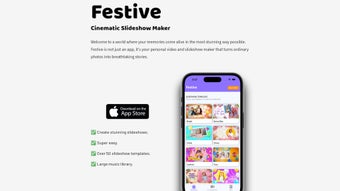
Festive Slideshow Maker is a cloud‑based multimedia application that transforms ordinary photo collections into engaging, story‑driven slideshows with just a few clicks. Built for both casual users who want to share a birthday memory on social media and for professional creators who need polished presentations for events, the platform blends an intuitive drag‑and‑drop canvas with powerful AI‑assisted features. The AI‑generated quote engine scans the visual content and suggests heartfelt sayings that match the mood of each slide, saving users time on research and adding a personal touch that feels handcrafted.
All editing occurs within a secure browser environment, meaning there is no bulky installation, no frequent patching, and no compatibility headaches—your work lives entirely in the cloud, automatically saved and encrypted with AES‑256 standards. Users can choose from a library of more than 50 professionally designed templates, ranging from festive holiday themes to elegant corporate layouts. Integrated royalty‑free music tracks are categorized by genre and tempo, while the option to upload your own audio files ensures that every slideshow can reflect your unique soundtrack.
Once finished, projects can be exported in high‑definition MP4, animated GIF, or shared instantly via a secure, password‑protected link. Whether you’re commemorating a family reunion, launching a product demo, or simply creating a digital photo album for a friend, Festive Slideshow Maker delivers speed, creativity, and reliability without sacrificing quality.
Key Features and How to Get Started
Core Feature Set
- Extensive Template Library: Over 50 ready‑made themes (Birthday, Romantic, Holiday, Graduation, Business Pitch, etc.) with customizable color palettes and layout variations.
- Drag‑and‑Drop Canvas: Real‑time visual editing lets you place, resize, and reorder images without any technical training.
- AI‑Generated Quote Engine: The smart algorithm analyses image content, detects emotions, and suggests context‑aware quotes that you can edit or replace.
- Integrated Music Hub: Curated royalty‑free tracks sorted by mood, tempo, and genre; plus support for MP3/WAV uploads up to 50 MB.
- Custom Text & Typography: Over 30 fonts, animated text effects, and full control over size, color, and timing.
- Multiple Export Formats: MP4 (up to 1080p for premium users), animated GIF, or a secure shareable link that streams directly from the cloud.
- Cloud Workspace & Auto‑Save: Projects are saved continuously, accessible from any device, and can be duplicated or archived with a single click.
- Collaboration Tools: Invite teammates or family members to view or edit a slideshow via email invitation, with role‑based permissions.
- Responsive Design: The editor adapts to desktop monitors, tablets, and smartphones, ensuring a consistent experience on Windows, macOS, Android, and iOS.
- 24/7 Customer Support: Live chat, email assistance, and a searchable knowledge base help resolve issues instantly.
Installation & Usage Instructions
Because Festive Slideshow Maker is fully web‑based, there is no traditional software download. Follow these simple steps to start creating your first slideshow:
- Open the Official Website: Launch Chrome, Edge, Safari, or Firefox and go to festiveslideshowmaker.com.
- Create Your Account: Click “Sign Up,” enter a valid email address, and choose a strong password. You can also sign in with Google or Apple for a faster start.
- Select a Template: After logging in, browse the template gallery. Use filters such as “Occasion,” “Style,” or “Resolution” to find the perfect match.
- Upload Your Media: Drag photos and videos from your computer, tablet, or smartphone onto the workspace. Supported formats include JPEG, PNG, HEIC, MP4, and MOV (max 20 MB per file).
- Arrange & Enhance Slides: Reorder thumbnails, set transition styles (fade, slide, zoom), adjust slide duration, and apply AI‑suggested quotes or your own text.
- Add Audio: Choose a track from the built‑in library or upload your own MP3/WAV file. Use the waveform editor to trim or loop the music as needed.
- Preview in Real Time: Click “Preview” to view a full‑screen playback. Make any final tweaks to timing, text animation, or color balance.
- Export or Share: Hit “Export” and pick MP4 (720p for free users, 1080p for premium), GIF, or generate a secure share link. All exported files are stored automatically in your cloud workspace for future edits.
This streamlined workflow typically takes under 15 minutes for a 20‑photo slideshow, making Festive Slideshow Maker ideal for quick social posts as well as more elaborate presentations.
System Compatibility, Pros, and Cons
Supported Operating Systems
Festive Slideshow Maker runs on any modern operating system that can launch a current web browser. Supported platforms include Windows 10/11, macOS 12+, major Linux distributions (Ubuntu, Fedora, etc.), Android 8+ (via Chrome or Firefox), and iOS 13+ (via Safari). Because all processing, including AI quote generation and video rendering, occurs on secure cloud servers, device performance requirements are minimal; even older laptops and mid‑range smartphones can edit smoothly as long as a stable internet connection is available.
Pros
- Completely web‑based – no downloads, installations, or periodic updates required.
- Rich library of professionally designed templates for a wide range of occasions.
- AI‑driven quote suggestions eliminate the need for manual research and add a personal touch.
- High‑definition export options (up to 1080p) suitable for YouTube, Instagram, and corporate presentations.
- Responsive interface works consistently on desktops, tablets, and smartphones.
- Generous free tier with essential features; premium plans are affordably priced and unlock advanced animations, higher resolution exports, and additional music tracks.
- Secure cloud storage with AES‑256 encryption and GDPR compliance.
- Collaboration capabilities let multiple users edit or review a project simultaneously.
Cons
- Requires an active internet connection; offline editing is not possible.
- Advanced 3D transitions and premium‑only animation effects are locked behind a subscription.
- Export queue may experience delays during peak usage periods, especially for free‑tier users.
- RAW image files are not supported directly; they must be converted to JPEG or PNG before upload.
- Free tier limits video export resolution to 720p, which may be insufficient for professional broadcast needs.
Overall Rating: 4.5/5 – Festive Slideshow Maker provides an intuitive, feature‑rich experience for creating memorable slideshows, with only minor drawbacks related to offline use and premium‑only effects.
Frequently Asked Questions
-
Is Festive Slideshow Maker really free?
Yes. The free tier grants access to the core editor, basic templates, drag‑and‑drop functionality, and MP4 export up to 720p resolution. Premium subscriptions unlock higher‑resolution exports, exclusive animation effects, additional royalty‑free music tracks, and priority rendering.
-
Can I upload my own music to a slideshow?
Absolutely. While the built‑in library offers a wide selection of royalty‑free tracks, you can also upload MP3 or WAV files up to 50 MB. Uploaded audio is stored securely and can be reused across multiple projects.
-
What file formats are supported for export?
You can export slideshows as MP4 video (720p for free users, 1080p for premium), animated GIF, or generate a password‑protected share link that streams directly from our cloud servers. All exports retain embedded captions and audio tracks.
-
Is my data safe on the cloud?
Festive Slideshow Maker uses AES‑256 encryption for data at rest and TLS 1.3 for data in transit. Our servers comply with GDPR, and we never sell personal information to third parties. Users can permanently delete projects at any time from their dashboard.
-
Do I need a powerful computer to run the editor?
No. Because all heavy processing happens on remote servers, even modest devices—such as older laptops, Chromebooks, or smartphones—can edit slideshows smoothly, provided you have a stable internet connection.
Conclusion – Why You Should Download Festive Slideshow Maker Today
In today’s fast‑paced digital world, visual storytelling has become a cornerstone of personal expression and marketing alike. Festive Slideshow Maker stands out by delivering a complete, browser‑based solution that removes the friction of traditional desktop software while offering a professional‑grade feature set. Its extensive template library, AI‑generated quotes, and integrated music hub empower anyone—from grandparents crafting a family memory to small business owners promoting a new product—to produce polished, high‑definition slideshows in minutes.
The free tier is generous enough for occasional users, and the affordable premium plans provide the extra power needed for commercial projects without locking essential tools behind exorbitant prices. With secure cloud storage, cross‑device compatibility, and responsive support, you can create, edit, and share your stories from anywhere, at any time. Ready to turn your photo collection into a captivating visual narrative?
Download Festive Slideshow Maker now and start sharing unforgettable moments instantly.



.png)



